Apps
- Who it’s for
- Lab owners who want to run things like Immich, Plex or AdGuard Home on their own servers.
- What it covers
- Picking an app, choosing where it runs, keeping it updated and backed up, and what to do when it looks unhappy.
- Why it exists
- Most self-hosted software ships as Docker containers. Lucia does the Docker work so you don't have to learn it first.
An app is a piece of software that runs on one of your servers, packaged as a Docker container. A photo library, a media server and an ad blocker are all apps. You choose one, pick the server, and Lucia sets up its folders, its web address, its sign-in and its backups.
Only lab owners see the Apps page. Everyone else in your lab just uses the apps once they're running.
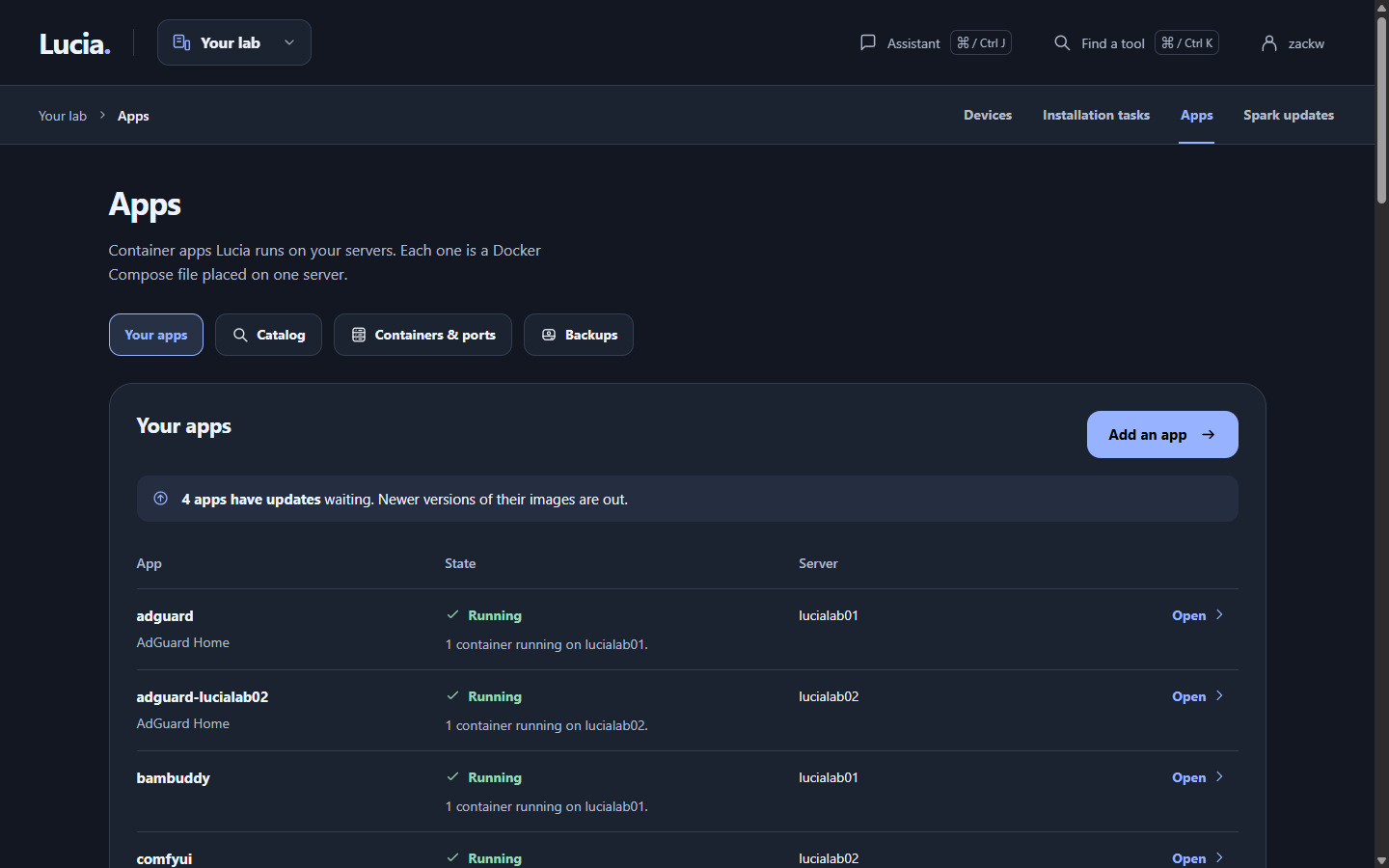
The Apps page. Each row shows the app, its state and the server it lives on.
Install an app from the catalog
- Open Apps and click Add an app. The catalog lists everything Lucia knows how to set up.
- Pick an app. Lucia shows which of your servers can run it. A server that can't, because it's offline, has no Docker yet or lacks a graphics card the app needs, says why.
- Choose a server and look over the settings. The defaults work for most people. The ones you'll most often change are the web name and a media folder on your NAS (the network storage box).
- Click install. The server picks the app up within about 20 seconds, downloads it and starts it.
The first install of a big app can take several minutes while Docker downloads images. The state column says Applying changes until it's done.
What's in the catalog
| Area | Apps |
|---|---|
| Lab infrastructure | AdGuard Home, Object storage, Observability, GitHub Actions runner |
| AI | Local AI, LiteLLM |
| Photos and media | Immich, Plex, MusicBrainz |
| Media automation | Sonarr, Radarr, Lidarr, Seerr, Jackett, NZBHydra 2, FlareSolverr, a download client behind a VPN |
| Home | Home Assistant, Mosquitto, Voice, ESPHome, Matter Server, Music Assistant, Node-RED |
A few of them come with extras:
- AdGuard Home gets an address of its own on your network, so devices never lose their DNS server when it moves.
- Observability gives you Grafana graphs of your servers. See Monitoring.
- Object storage hands out private storage buckets to apps that need one. Observability is the first.
- Grafana, Immich, LiteLLM and the Object storage console sign you in with your Lucia account. Nothing to set up.
- The GitHub Actions runner can also run on the Spark itself when a build needs an ARM64 machine. It starts when you ask and stops when idle.
Your own app
If the software you want isn't in the catalog, choose Your own app and paste its Docker Compose file. Most self-hosted projects publish one in their documentation. You can add an environment file too. Lucia keeps both and runs them on the server you choose.
Where an app runs
You choose a server for each app. You can move it later from its page, and Lucia carries its data along. The app stops during the move, so pick a quiet moment.
A few apps, like Local AI, are tied to one server's graphics cards and can't move. Install them again on the other server instead.
Lucia runs up to 64 apps in total and 32 per server.
What you can do on an app's page
Click an app's name to open it. From there you can:
- start, stop or restart it;
- read the recent log lines of each container;
- see its ports and web addresses;
- change its settings;
- update it;
- delete it.
Apps → Containers & ports shows every container on every server, including ones Lucia didn't start.
Delete takes the app's containers down and removes its configuration from the server. Its data stays in /srv/lucia/stacks/<app>/ on that server until you remove it yourself.
Web addresses
Once you've set up your domain, an app with a web page gets its own name, like immich.<your-lab-name>, with a proper certificate. You can open it from any device on your network. See Your domain.
An app can also be reachable from the internet through Cloudflare. That's off until you turn it on for a specific app.
Storage on your NAS
Under Settings → Storage you add shares from your NAS, over NFS or SMB. Lucia mounts each share on every server at the same path, /mnt/lucia/nas/<nas>/<share>, so an app keeps working if you move it. Lucia only reads your NAS settings and mounts the shares. It never changes anything on the NAS itself.
Private image sign-ins
Some apps come from private registries, which are like password-protected app stores. Settings → Registries keeps your sign-in for Docker Hub, GHCR or one you host. Lucia tests each sign-in before saving it and hands it to every server. You can keep up to 16.
Backups
Under Apps → Backups, choose a NAS share as the destination. After that, Lucia backs up every app's folder at 03:00 each night. Backups are encrypted, and only changed data is stored again. Lucia keeps 7 daily, 4 weekly and 6 monthly copies.
- Back up now on an app's row starts one straight away.
- Restore on any kept copy stops the app, swaps that copy's data in and starts it again. Your previous data isn't deleted. It's set aside in a folder named
.replaced-<app>-<date>beside the app. - Show recovery key reveals the repository's password. Write it down somewhere safe. Without it, the backups can't be opened.
Apps whose data is only consistent while they're stopped, such as Plex and LiteLLM, stop for the length of their backup.
Updates
Every 6 hours, Lucia checks whether newer versions of each app's images exist. An app with one shows Update available. A change in the first number of a version shows Major update, which often means breaking changes. Read the release notes before taking one.
Click Update and Lucia downloads the new images and restarts the app. Lucia doesn't update anything by itself.
Catalog apps also get improvements from Lucia. If a newer version of the app's recipe exists, its settings section says so and offers an Update button.
When something looks wrong
| You see | What it means | What to do |
|---|---|---|
| Applying changes for more than a few minutes | The server is still downloading images or starting containers | Wait. Big images are slow. Open the app and read the container logs if it never finishes |
| Waiting | The app needs a NAS share or its own address that isn't there yet | Check Settings → Storage, and that the NAS is on. It clears by itself |
| Failed | The server couldn't apply the app. The message says why | Fix the cause, such as a port that's taken. Lucia retries every 2 minutes |
| Needs attention | Some containers are running and some aren't | Open the app and read the logs of the stopped one |
| Server not reporting | The server hasn't checked in recently | See Servers. It may be off, or need an agent update |
| Backup Failed | Often the NAS share isn't mounted | Check the share, then back up again |
If an app still won't start, ask the assistant to look at its logs.
For how this works underneath, see Apps and stacks and Running apps.