Servers
- Who it’s for
- Lab owners with one or more servers that Lucia installed.
- What it covers
- What the Devices page shows for each server, the buttons on it, how to sign in over SSH, and how to retire a server.
- Why it exists
- Lucia installs a server once and then looks after it. You shouldn't need a monitor and keyboard again, so everything routine happens from the browser.
A managed server is a computer that Lucia installed Debian on and now looks after. Each one runs a small program called the node agent. The agent reports in every 30 seconds, installs updates when you ask, and runs your apps. To add one, see Adding a server.
The Devices page
Open Your lab → Devices. Managed servers are listed under Your servers.
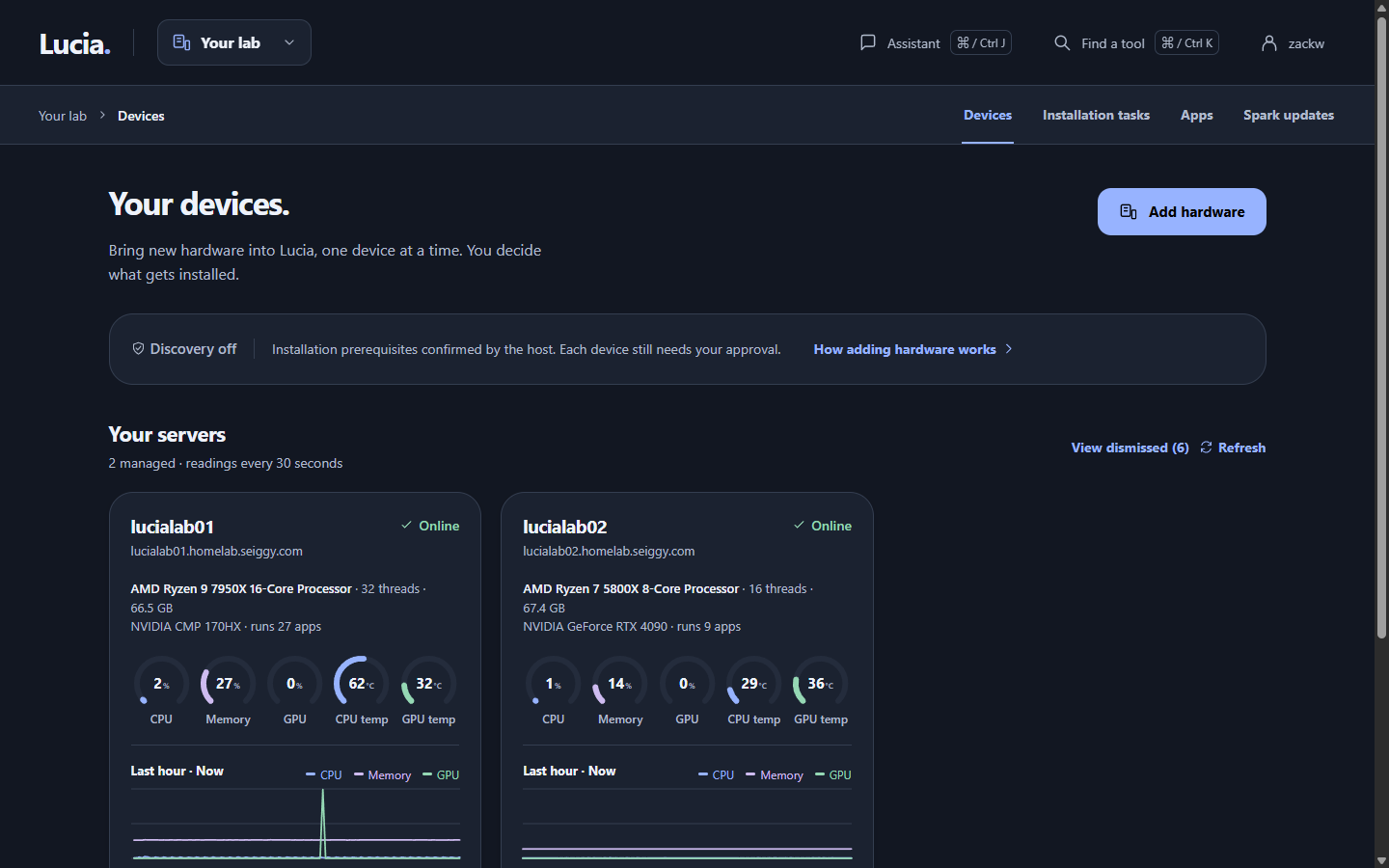
Each card shows the server's name, address and health. Click Manage to open the details.
A server's status is one of three things.
| Status | Meaning |
|---|---|
| Online | The agent reported in during the last 2 minutes. |
| Readings stale | The agent hasn't reported for more than 2 minutes. The server may be off, restarting or cut off from the network. |
| Waiting for agent | Lucia installed the server, but its agent hasn't reported in yet. This is normal for the first minute after the first boot. |
Click Manage on a card for the details: memory, storage, the Debian version, when the server's certificate expires, and the hardware Lucia found when it first saw the machine. Lucia keeps the last hour of CPU, memory and temperature readings for each server. The graphs start again from empty if Lucia restarts.
Updates and restarts
The Updates section lists Debian package updates waiting on the server. Lucia checks every six hours.
- Install updates installs them. Apps on that server can restart briefly.
- Check now looks again straight away.
- Update agent appears when Lucia has a newer node agent for the server. The agent reconnects in about a minute.
- Restart… asks you to confirm, then restarts the server. Its apps stop until it's back, usually a few minutes.
If a kernel or system library changed, the page says Restart this server to finish installing updates. These buttons only work while the server is online.
Lucia never removes packages or moves a server to a newer Debian release on its own.
Sign in over SSH
SSH lets you open a text session on a server from your own computer. Use your Lucia account:
ssh yourname@servername
Only owners can sign in, and sudo asks for your Lucia password. The name of the server resolves once you've connected a domain. See Your domain.
To skip typing your password, add your public key under Settings → SSH keys. Paste the contents of your .pub file, or type a GitHub username and click Read public keys to import the keys listed there. Check the fingerprints, because GitHub can't prove who owns an account. Each account can have up to 10 keys. Servers pick up changes within about a minute, and removing a key removes it from every server.
Never paste a private key. Lucia only wants the public half.
The recovery account
Every server also has a local account called lucia-recovery. It has no password and accepts only the one SSH key you pasted when you approved the install. Use it if the directory is down and your own account can't sign in. Lucia never changes that key afterwards, so keep the matching private key somewhere safe.
Names and addresses
Once you've connected a domain, Lucia gives each server a name such as servername.home.example.com, and keeps it pointing at the server's current address. If you've also connected UniFi, Lucia asks your router to hold the server's address so it never changes. See Network.
Retire a server
Remove from Lucia… is at the bottom of a server's details. It makes Lucia forget the server, turn away its agent and drop its name. It doesn't erase the machine or shut it down. Lucia refuses while an app is still placed on that server, so move or delete those apps first.
To reuse the machine, boot it from the network again and add it as a new server. The old install is erased then.
When something looks wrong
| What you see | What to try |
|---|---|
| A server stays on Readings stale | Check that it has power and a network cable. Restart it from its power button if you can. If it comes back, it reports within a minute. |
| Waiting for agent for more than 10 minutes | Open Your lab → Installation tasks to see where it stopped. Adding a server lists what to check. |
| Actions are available while the agent is reporting | The server is offline. Wait for it to come back. |
| This agent is too old to update itself | The server runs an early agent. Someone with access to the Spark has to upgrade it once. See Managed nodes. |
| You can't SSH in with your account | Only lucia-owners can sign in. Check your account on Settings → People, and try lucia-recovery with your recovery key if the directory is down. |