Your domain
- Who it’s for
- Lab owners who want addresses like lucia.homelab.example.com instead of a bare IP number.
- What it covers
- What connecting a domain gets you, what you need first, the steps in plain words, and what to do when one fails.
- Why it exists
- Browsers distrust a lab that signs itself. A domain you own lets Lucia get a certificate every browser accepts, without opening your router to the internet.
What a domain gives you
Out of the box you reach Lucia by the Spark's own name, and your browser may warn you about the certificate. Connect a domain and three things change.
- Real names. Lucia, the sign-in page and each app get an address such as
https://lucia.homelab.example.comorhttps://grafana.homelab.example.com. - A padlock that works. Lucia gets a free certificate from Let's Encrypt, so browsers and phones stop complaining.
- Names that stay at home. Your lab's own DNS server (AdGuard Home) answers for these names. Outside your house, they lead nowhere. Nothing is published to the internet and no port on your router opens, unless you turn on public access for a particular app.
You must be a Lucia owner to see this page. It lives under Settings → Domains, titled DNS & certificates.
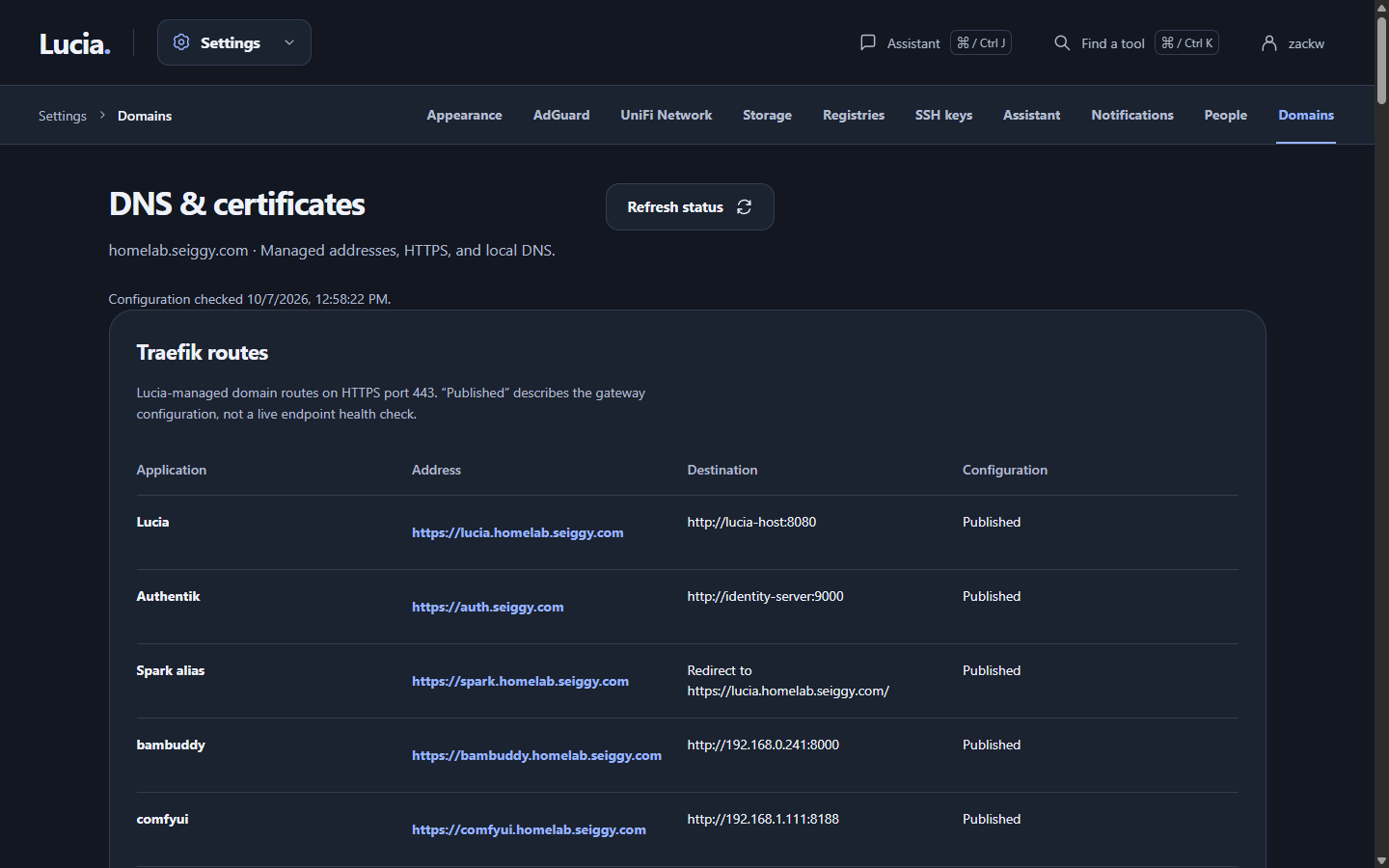
After setup, this page shows your routes, the certificate and its expiry, and the DNS records Lucia keeps.
What you need first
| You need | Why |
|---|---|
| A domain name you own | Any registrar works. You do not move it or give Lucia access to it. |
| That domain served by Cloudflare | Cloudflare must already be the domain's DNS provider. A free account is enough. |
| A Cloudflare token | A key that lets Lucia prove to Let's Encrypt that you own the domain. The steps below make one. |
| AdGuard Home, connected to Lucia | It answers the local names. Connect it at Settings → AdGuard first. See Network devices. |
| The Spark's LAN address | Lucia asks for it, for example 192.168.1.10. |
Lucia also needs a small helper service on the Spark to finish activation. If it is not running, the page tells you setup cannot begin. Your installer turns it on, but it relies on a Linux setting called lingering, which keeps a user's background services alive after logout. Ask whoever installed the Spark to run loginctl enable-linger for the setup account if you see that message. The deployment page has the detail.
Make the Cloudflare token
The token is the one fiddly part. Take it slowly, and make it narrow.
- In Cloudflare, open Manage Account → Account API Tokens → Create Token. Use the account page, not My Profile.
- Name it Lucia DNS & certificates and pick the Edit zone DNS template.
- Under Permission policies, find the policy that says All zones in your account. Change it to only your domain, the root one such as
example.com. - Add a second policy: Zone Read, on that same single zone. Zone Read is not the same as DNS Read, and you do not need DNS Read.
- Create the token and copy it right away. Cloudflare shows it once.
- In Cloudflare's search box, type Copy account ID and copy that too. You want the account ID, not the zone ID.
:::warning Treat the token like a password It can edit every DNS record in that domain, not just the ones Lucia uses. Lucia stores it encrypted on the Spark and never shows it again. If you ever think it leaked, delete it in Cloudflare and make a new one. :::
The steps in Lucia
Open Settings → Domains. Lucia walks you through four screens.
-
Connect Cloudflare. Paste the account ID and the token. Lucia checks that the token works and lists your domains.
-
Name your lab. Pick the domain, then a local subdomain (a word such as
homelab) and a name for the Spark (such asatlas). Lucia suggests addresses:https://lucia.homelab.example.comfor Luciahttps://auth.homelab.example.comfor the sign-in pagehttps://atlas.homelab.example.comfor the Spark, which simply forwards to Lucia
Open Customize service URLs to change any of them. Then enter the Spark's LAN address and an email address for Let's Encrypt.
-
Review. Lucia lists every address, every certificate name and every DNS record it will add, and checks your setup for problems. Fix anything listed under Setup is blocked. To go on, tick two boxes: you accept the Let's Encrypt subscriber agreement, and you approve the changes. Certificates are public records, so the names on them can be looked up by anyone.
-
Set up DNS & certificates. Lucia works through it while you watch. It tests with Let's Encrypt's practice server first, gets the real certificate, installs it, adds the records to AdGuard, and restarts Lucia on the new address.
The review expires after 30 minutes. If you wait longer, Lucia asks you to prepare a fresh one.
When it finishes, open Lucia at its new address and sign in again. Everyone has to, because the sign-in page moved. The old address keeps working as a way back in if something goes wrong. Closing the browser tab does not cancel anything; the work continues on the Spark.
:::note One domain per lab Lucia supports one domain. Changing it later is a separate, planned move, not something you edit. :::
After it is set up
Revisit Settings → Domains and you get an overview, not the wizard. It shows:
- Traefik routes, the addresses Lucia publishes. This is what is configured, not a live health check.
- Let's Encrypt, with the certificate names, its expiry date and the result of the last renewal check.
- AdGuard records, the local DNS entries Lucia keeps, with a flag on any that are missing, switched off or conflicting.
The page refreshes itself every minute. Refresh status does it now. Refreshing only reads; it never changes anything.
Lucia checks the certificate every 12 hours and renews it when it is close to expiring. You do nothing. The one thing that can stop renewals is an expired or deleted Cloudflare token. If you set an expiry on it, replace it in Lucia (Replace Cloudflare token) before that date.
Sharing an app with the internet
Public access is off until you ask for it, and it is meant for things like sharing photos from Immich with family. When you turn it on:
- Lucia adds public records at Cloudflare for the sign-in page and for each app you chose to share.
- If UniFi is connected, Lucia sets up the router's forward from the internet port, which is 443 unless you change it. Otherwise you forward that port to the Spark's port 8445 yourself.
- Only Cloudflare's servers can reach that entry point.
- The sign-in page moves to
auth.example.com, so Lucia restarts and everyone signs in again.
Most home connections allow port 443, so the default is fine. Some providers block it. If yours does, open Internet port under public access and enter another number. Then add a Cloudflare Origin Rule that sends your public names to that port. Lucia moves its router forward to match. A forward you already have on that port is taken over, and it keeps its source limits.
Turning it off removes Lucia's records and disables its forward. Pick which apps are public on each app's page under Apps. Anything you make public should have its own login.
When it fails
If a step fails, Lucia keeps the failed attempt on screen with a plain explanation and what to do next. It also undoes what it changed, so a failed attempt does not leave half a setup behind. Open Technical details for the exact phase and what the checks found.
| What you see | What it usually means | What to do |
|---|---|---|
| "Connect AdGuard first" | Lucia has no local DNS server to talk to. | Connect AdGuard at Settings → AdGuard. |
| No domains in the list | The token cannot see your domain, or Cloudflare is not its DNS yet. | Check the account ID, that the token covers the domain, and that the domain's nameservers point at Cloudflare. |
| "Public DNS delegation does not match" | The registrar still points at other nameservers. | Change the nameservers at your registrar to the two Cloudflare shows. Wait, then review again. |
| "AdGuard already has a conflicting rewrite" | You have a hand-made DNS rule for one of the names. | Remove or change that rule in AdGuard, or pick a different name. Lucia never overwrites your rules. |
| A certificate error in staging | The token lacks DNS Write, is scoped to the wrong zone, or DNS was slow. | Recreate the token as above. In DNS propagation wait, raise the seconds. |
| The certificate was issued but the HTTPS check failed | The gateway did not load it, or something answers on the wrong address. | Use Review setup again. Keep your token; this is not a token problem. |
| "Finish recovery before creating another setup" | A DNS change could not be confirmed, so Lucia will not guess. | Press Retry ownership-checked cleanup. If it still fails, review the AdGuard rule it names. |
If a local AI model is loaded, Lucia can add a short plain-language explanation of the failure. It only ever sees a fixed summary, never your logs or token, and it cannot change anything. It is advice, not a repair.
Anything these steps do not cover, such as ports, certificates on disk and checking the gateway, is on the networking and DNS deployment page.