
Secrets
The Secrets page stores values such as passwords and API tokens in Windows Credential Manager (generic credentials named WslcDesktop/secret/<name>). Containers and compose files refer to a secret by name, and the value is only filled in when a container is created.
Managing secrets
- Add secret: a name (letters, digits,
.,_,-), an optional label, and the value. - Edit: change the label or value. Leave the value blank to keep the current one.
- Reveal: shows the value for 15 seconds, then hides it again.
- Copy token: copies
${secret:name}to the clipboard. - Delete: asks for confirmation. Containers that reference the secret keep running, but new ones can't be created until it is added again.
Values are limited to 2,560 bytes (a Credential Manager limit).
Referencing a secret
Use the token ${secret:NAME} in an environment variable value:
services:
  db:
    image: postgres:17
    environment:
      POSTGRES_PASSWORD: ${secret:db-password}
The token also works in the New container dialog (pick a stored secret from the list, or type KEY=${secret:name}).
Compose's top-level secrets: is supported too. An entry with no file, environment or content points at a stored secret (use name: to map to a different stored name). An entry with a file:, environment: or content: source is stored under the entry's key, and the app offers to import the source's current content (see below). WSLc has no secret mounts, so there is no option to keep referencing the file.
services:
  app:
    image: myapp
    secrets: [db_password]
secrets:
  db_password: {}
This becomes the environment variable DB_PASSWORD. WSLc has no secret mounts, so secrets are delivered as environment variables, not files.
Tokens are rejected anywhere else (labels, build args, commands, ports, and so on). env_file contents aren't scanned for tokens.
Creating secrets while importing a compose file
You don't need to visit the Secrets page first. When a compose file contains ${secret:NAME} tokens or secrets: entries, the Up dialog shows a Secrets needed section:
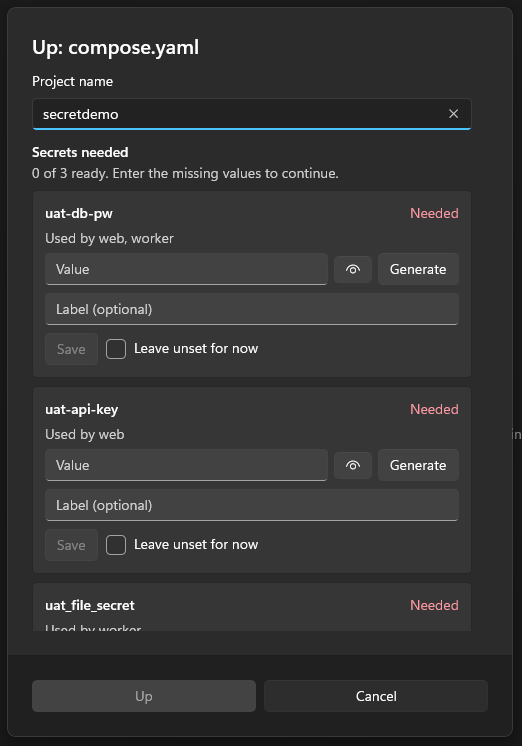
- Every secret is listed with the services that use it and its state: Stored, Needed, Ready to save, Left unset or Will replace stored value.
- For a missing secret, type a value (masked, with a reveal button) or press Generate for a random 32-character value. Add an optional label if you like.
- Save stores one secret now; Save all stores every entry that has a value. Whatever is still unsaved when you press Up is saved first.
- Import from … appears for secrets with a
file:,environment:orcontent:source and fills the value from that source. - A stored secret shows Stored with Replace (enter a new value) and Keep stored value.
- Leave unset for now saves nothing. The consequence is that Up stays disabled until every secret is stored or has a value, because an unresolved token can't be started.
Up enables as soon as every required secret is stored or ready. Values typed in the dialog are kept only in memory until saved, so Cancel stores nothing. Values are never logged, and the preview keeps showing tokens.
The same section appears in the New container dialog when you type a ${secret:NAME} token for a secret that isn't stored yet; Create saves them first.
How the value reaches the container
- Owned session: passed through the process settings' environment variables.
- Attached session (the app drives the
wslcCLI): the command line carries only--env NAME, and the value is placed in the environment of the launchedwslcprocess. It never appears on a command line or in logs. Reserved names (such asPATHorWSL*) use a temporary--env-filethat is deleted straight away.
Secrets are read at run time only; the app keeps no other copy.
Redaction
Anywhere the app shows or copies container data (inspect, Raw JSON and Copy, logs, compose previews, error messages), any stored secret value is replaced with its token, for example ${secret:db-password}.
Best-effort
Redaction is substring matching. It skips values shorter than 4 characters and can't recognise a value that a program has transformed (encoded, split or hashed). A container's own environment still holds the real value, so docker inspect-style tools outside this app will show it.